What Vantage Is
Every team tracks two different kinds of information. Inside the company, updates happen across CRM deals, sales calls, Slack channels, and issue trackers. Outside the company, news breaks across regulatory filings, funding announcements, and tech discussions.
I'm building Vantage so you don't have to check ten places every morning. Right after signing in—even before creating a company workspace—you get a live Market Hub with Hacker News stories, SEC EDGAR filings, and business news. Once you set up a workspace and connect your team's tools, Vantage flags deal slips, project blockers, and leadership changes in one ranked feed.
The web dashboard is live today, and a companion mobile app is being built alongside it using the same backend and route rules.
Why I Started Building It
Single-tool notifications only know about their own database. That leaves blind spots between tools:
- A deal looks fine in Salesforce or HubSpot, while the customer hasn't replied in Slack for two weeks and a required feature is blocked in Linear.
- A watched customer or competitor files an 8-K officer departure with the SEC, and nobody connects it to an open renewal.
- Most 'AI workplace' tools try to summarize every routine chat thread into a long paragraph instead of staying quiet until something actually breaks.
Design Rules
Show what changed, link straight to the source record, and don't invent urgency.
- Works without AI keys: Hard rules set the priority floor first (for example, an SEC 8-K Item 5.02 officer departure or a 20% deal contraction is always P1 High). If no AI model is configured, the entire app still ingests, ranks, and displays every event.
- Useful before setup: You can read, search, filter, and bookmark global news in Market Hub without creating an organization or connecting OAuth tools first.
- Honest about missing data: If a news source doesn't provide an event occurrence date or if an upstream feed is slow, the UI says so plainly instead of guessing.
Command Feed & Morning Briefing
ImplementedA quick readout of P0 and P1 alerts at the top, with the ranked signal stream underneath.
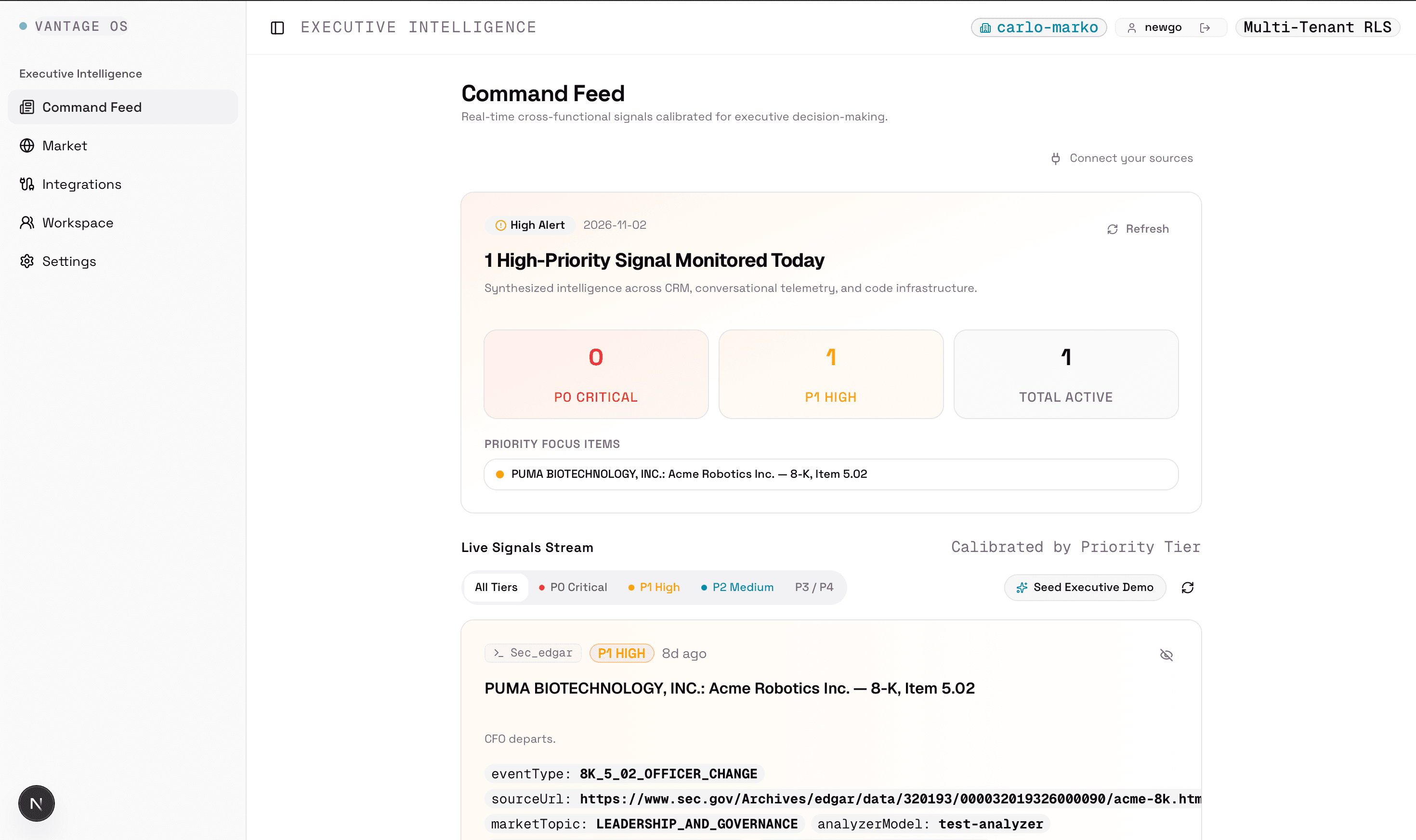
The Command Feed is the main workspace screen. The top card summarizes how many P0 Critical and P1 High signals are active today and lists the top focus items so you don't have to scroll to find urgent problems.
Below the summary card is the Live Signals Stream. You can filter between All Tiers, P0 Critical, P1 High, P2 Medium, and P3/P4 noise, or click 'Seed Executive Demo' on a fresh workspace to test the feed with sample signals.
Why it matters
When every update looks the same, important warnings get buried. Separating P0 and P1 alerts from routine updates lets you see in a few seconds whether anything needs action today.
How it works
Each card shows the source (such as sec_edgar or salesforce), the priority badge, how long ago it happened, the headline, and structured metadata tags like the event type and direct source URL.
Challenges
- Keeping the feed useful when no tools are connected yet. New workspaces start empty, so adding a one-click demo seeder and letting watched SEC filings flow into the same stream makes the feed testable right away.
Currently working on
- Adding quiet-hours batching so P1 alerts wait for a 07:30 morning digest while P0 alerts notify immediately.
Market Hub: Global News, Hacker News & SEC Filings
ImplementedRead live Hacker News posts, SEC filings, and business news with search, filters, and personal bookmarks.
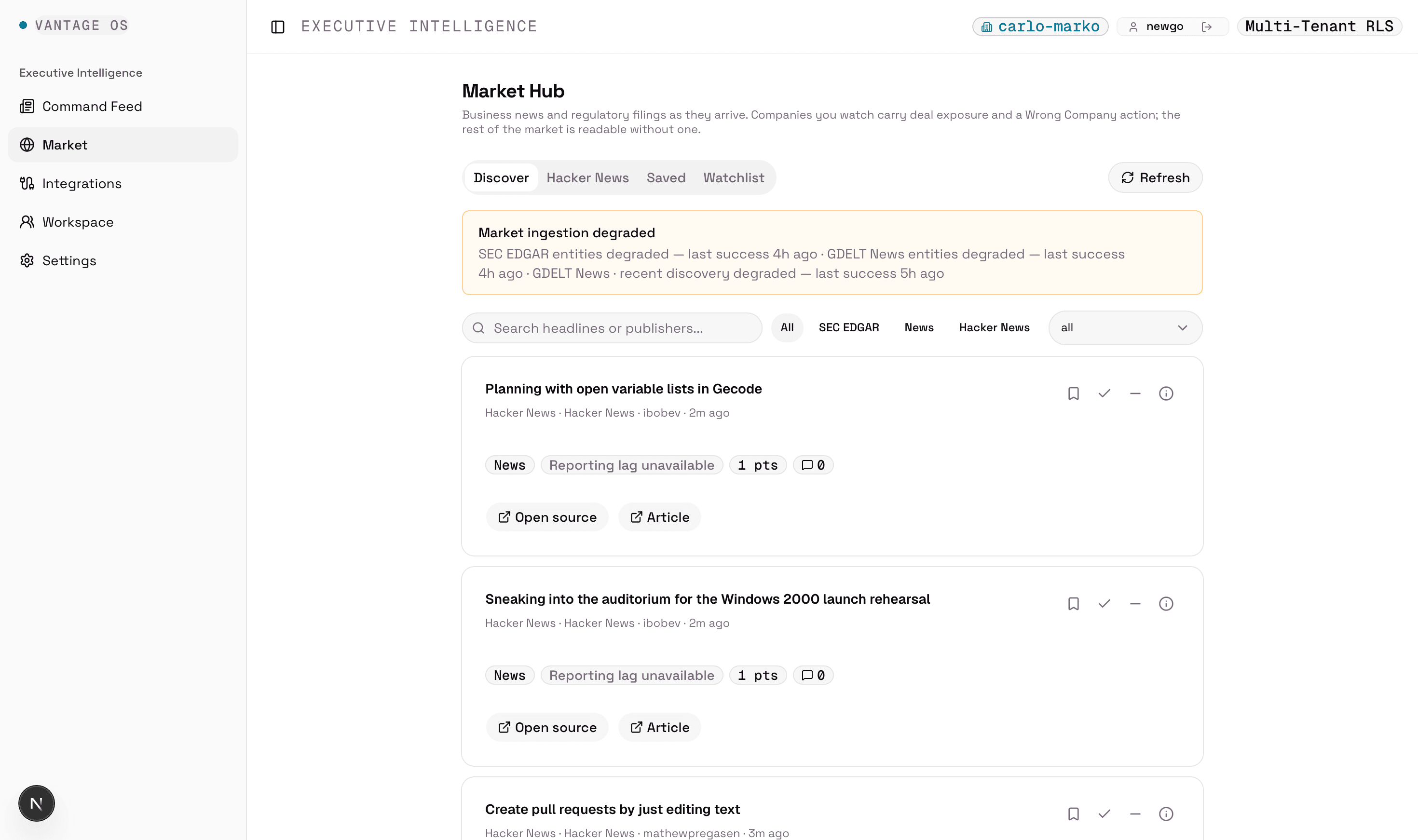
Market Hub is built as a standalone reader inside Vantage. It has four views: Discover (all sources combined), Hacker News (preserving HN's collections), Saved (your bookmarked stories), and Watchlist (companies your workspace follows).
You can search across headlines and publishers, filter by source (All, SEC EDGAR, News, Hacker News) or topic, and save, mark read, or hide individual stories using the action buttons on each card.
Why it matters
You shouldn't have to set up a company CRM just to read industry news or regulatory filings. Making Discover work for any signed-in user gives immediate value while keeping company watchlists one tab away.
How it works
A background worker polls Hacker News, SEC EDGAR, and GDELT under shared database leases and stores public items once for the whole platform. Personal actions—like bookmarking a story or hiding it from your feed—are stored per user so your changes never affect anyone else.
When an upstream provider is slow or rate-limiting, the status banner at the top reports which source is degraded and when it last succeeded rather than hiding the error.
Challenges
- Upstream rate limits and uneven source speed. Public APIs like GDELT and SEC EDGAR have strict rate limits and occasional timeouts. Isolating each stream's cursor and health state means Hacker News keeps updating even when GDELT or SEC is temporarily degraded.
Currently working on
- Tuning background poll intervals and expanding topic classification rules for general news.
Story Provenance & Lifecycle Timestamps
ImplementedEvery story card opens a provenance sheet showing exact timestamps, license rules, and source links.
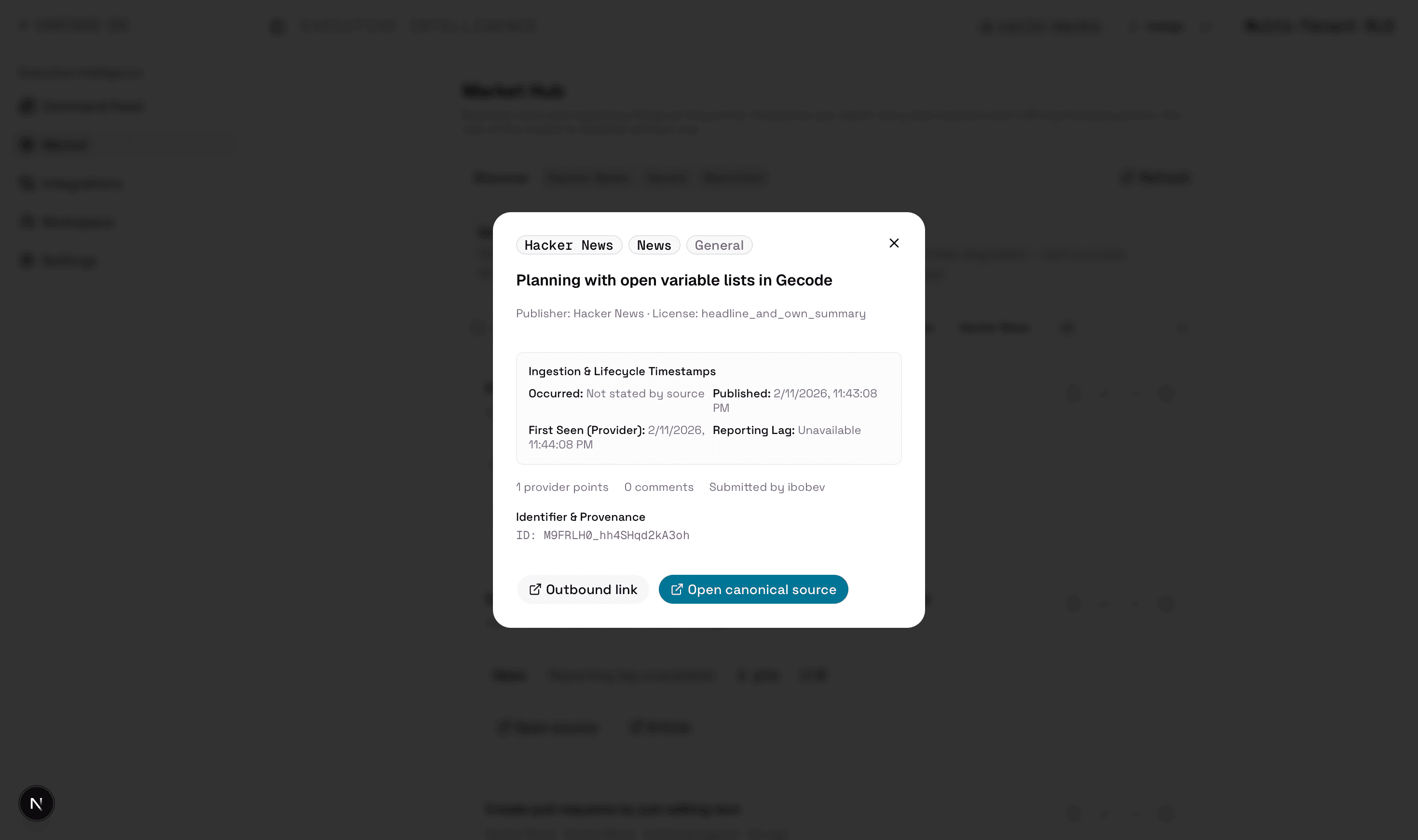
Clicking the info icon on any Market Hub card opens its provenance modal. It shows the publisher, the source display license (such as headline_and_own_summary), provider engagement (points, comments, author), and links to both the outbound article and the canonical discussion or filing.
Why it matters
News aggregators often blur when an event actually happened versus when a scraper found the link. Separating those dates prevents old stories from looking like breaking news.
How it works
Vantage tracks four separate timestamps for every item: when the underlying event occurred (such as an 8-K event date), when it was published, when the provider first indexed it, and the resulting reporting lag. If a source doesn't state an event date, the modal explicitly says 'Not stated by source' and 'Reporting Lag: Unavailable'.
Challenges
- Enforcing source display rules in code. Different providers allow different things—some allow full summaries while others only allow headlines and outbound links. Attaching the license policy to each record ensures the UI only renders what is permitted.
Currently working on
- Adding related-company badges inside the modal when a story matches a watched entity.
Signal Drill-Down & Priority Calibration
ImplementedInspect the exact rule and metadata behind a signal, then rate it to tune future alerts.
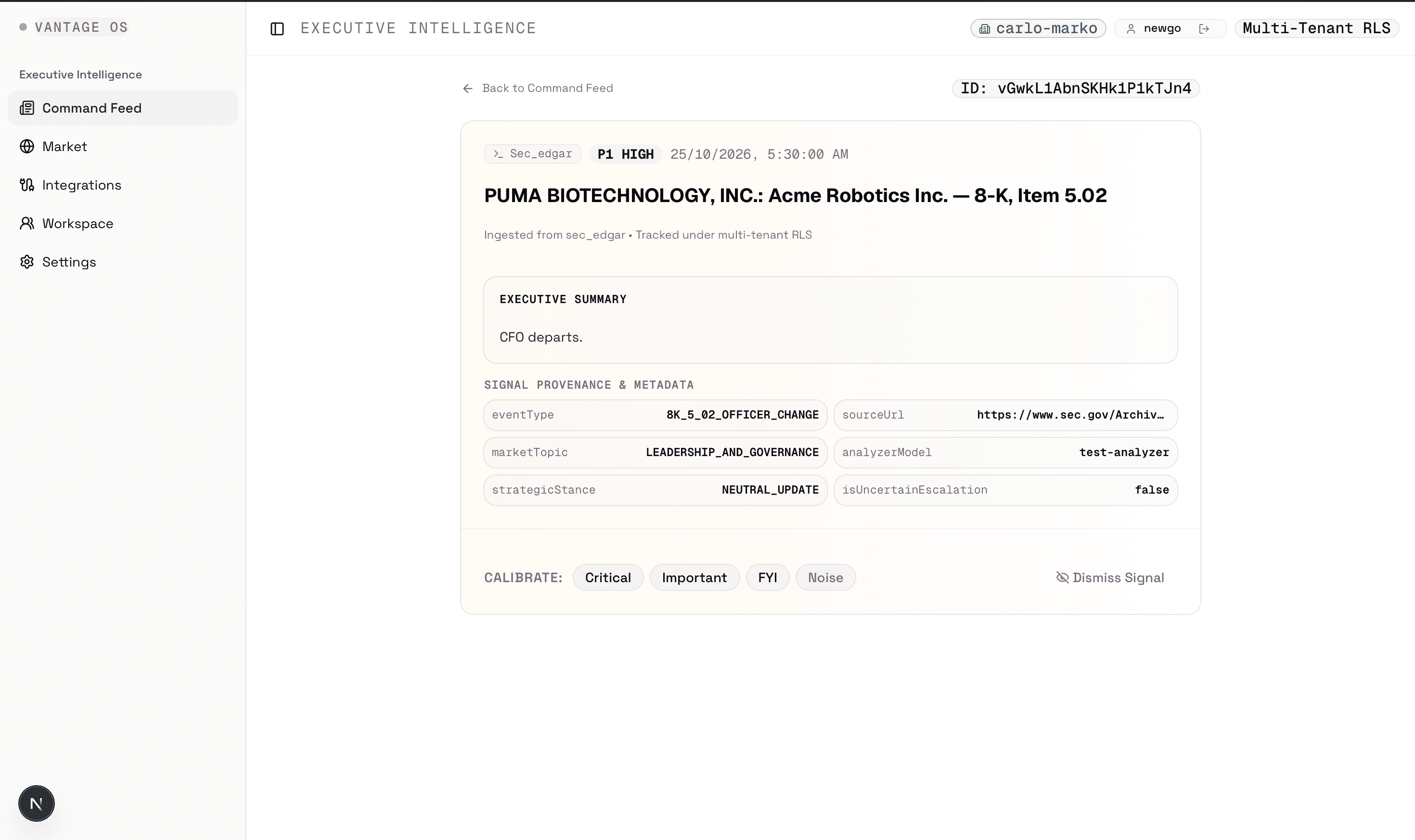
Opening a signal from the Command Feed takes you to its drill-down page. It displays the executive summary, the exact timestamp and source badge, and a grid of provenance metadata—such as the eventType (8K_5_02_OFFICER_CHANGE), marketTopic (LEADERSHIP_AND_GOVERNANCE), sourceUrl, and whether it was an uncertain escalation.
At the bottom, you can calibrate the signal as Critical, Important, FYI, or Noise, or dismiss it from the active feed.
Why it matters
Different leaders care about different thresholds. Letting each user rate signals directly on the detail view gives a clean feedback loop without complex settings menus.
How it works
Ratings are stored per user and workspace under database row-level security, and dismissing or rating a signal immediately updates the cached Command Feed and Morning Briefing counts.
Challenges
- Keeping deterministic floors unbreakable. User feedback helps tune borderline alerts, but hard statutory rules (like a CEO or CFO departure in an 8-K filing) keep their minimum priority floor so critical events are never accidentally muted.
Currently working on
- Adding a follow-up question box on this screen so you can ask questions against your workspace's synced records.
Zero-Custody SaaS Integrations
ImplementedConnect Salesforce, HubSpot, Gong, Slack, and Linear without storing raw provider credentials in Vantage.
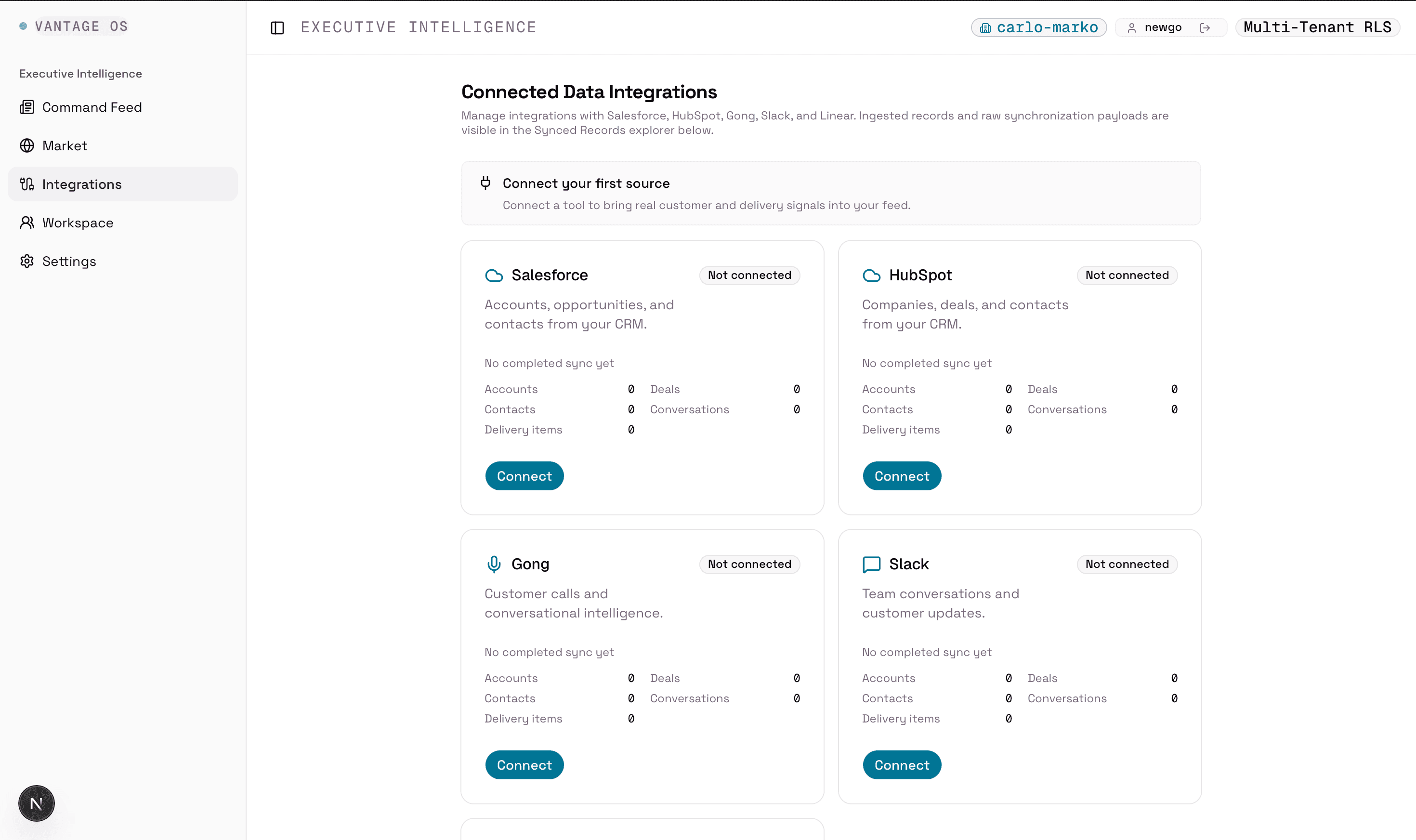
The Integrations screen manages connections to your internal tools: Salesforce and HubSpot for CRM accounts, deals, and contacts; Gong for customer call metadata and transcripts; Slack for team conversations; and Linear for delivery items.
Each provider card shows its current connection status, last sync time, and exact record counts across Accounts, Deals, Contacts, Conversations, and Delivery items, followed by a Synced Records Explorer below.
Why it matters
Teams want to verify that their connection is healthy and see exactly how many deals, calls, or issues have been pulled in without digging through backend logs.
How it works
OAuth handshakes are handled through Nango, so Vantage only stores a connection pointer and status rather than raw OAuth tokens. Incoming webhooks are verified, queued in a database outbox, scrubbed for personal contact details and secrets, and normalized into shared tables.
Challenges
- Handling different CRM schemas and currencies. Salesforce and HubSpot structure deals and stages differently. Normalizing them on ingestion—and storing all money values in exact integer cents—keeps downstream rules consistent.
Currently working on
- Expanding connection health diagnostics when a provider token expires or hits API rate limits.
Multi-Tenant Workspaces & Account Isolation
Implementedbelong to multiple organizations and switch between them cleanly.
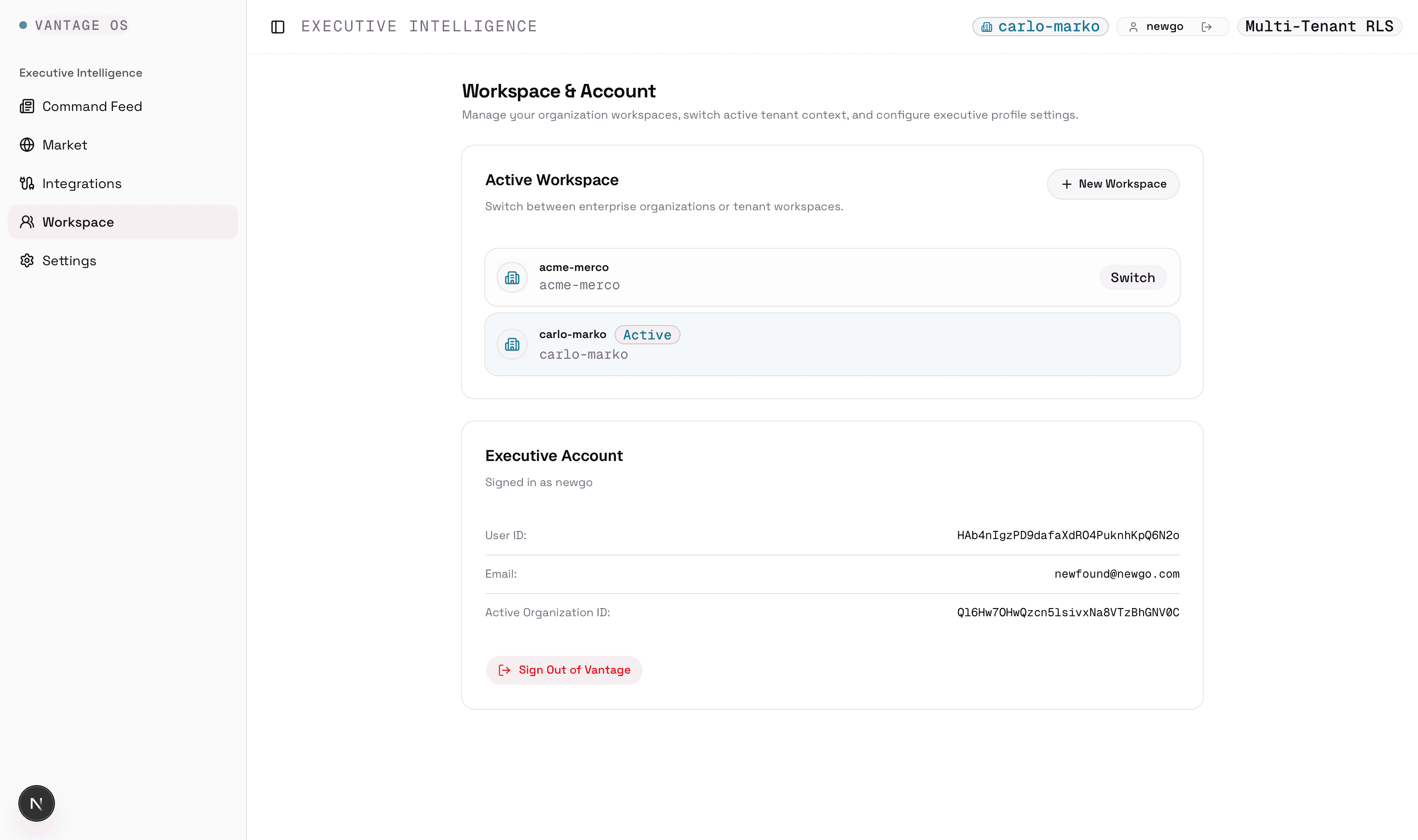
The Workspace & Account screen lists every organization you belong to (such as acme-merco and carlo-marko), marks which workspace is currently active, and lets you switch workspaces or create a new one in one click.
Why it matters
Founders, operators, and advisors often work across more than one company or environment. Switching workspaces has to be fast and must never leak cached data from one organization into another.
How it works
Every workspace query runs inside a PostgreSQL transaction locked to the active organization ID via Row-Level Security (RLS). When you click 'Switch' or 'Sign Out', Vantage cancels in-flight requests and wipes the client query cache before loading the new workspace.
Challenges
- Combining global tables with tenant-locked tables. Public market events live in shared read-only tables, while signals, deals, and watchlists are strictly locked per organization. Enforcing that split at the database role level prevents accidental cross-tenant reads.
Currently working on
- Adding workspace-level sensitivity presets and VIP deal thresholds to the settings panel.
Engineering Decisions & Trade-Offs
A few practical choices shaped how Vantage is built under the hood.
Two-stage caching for shared news + private user marks
Implemented- Why it's hard
- Caching the global Discover feed makes page loads fast, but if a cached page includes whether User A bookmarked or hid a story, User B would see User A's personal state.
- Decision
- Cache only the public story page in Redis with a validator that rejects any row carrying personal fields, then overlay the signed-in user's bookmarks, read status, and hidden items on read.
- Trade-off
- Requires a small second lookup for the user's personal marks, but guarantees zero cross-user leakage while keeping the heavy feed query cached.
Database-enforced Row-Level Security (RLS)
Implemented- Why it's hard
- Relying only on application 'WHERE organization_id = ...' clauses is risky—one forgotten filter in a new query can leak another company's data.
- Decision
- Enforce Postgres Row-Level Security policies on every organization and user table, verified by automated live database isolation tests.
- Trade-off
- Every database read has to open inside a scoped helper, which takes more discipline when writing new queries.
Deterministic rules first, AI optional
Implemented- Why it's hard
- If an app depends on an LLM API key just to render a feed, local development is painful and provider outages take the whole product down.
- Decision
- Compute priority floors and topic tags with deterministic rules first so the entire pipeline works with no AI key configured.
- Trade-off
- Plain rules are less flexible than a model on ambiguous text, so we pair them with optional model enrichment when configured.
What's Next
What I'm working on next:
Mobile app release alongside the web dashboard
Finish testing the companion mobile app so you can read Discover, check your Morning Briefing, and triage signals from your phone.
In progressFollow-up Q&A on Signal Detail
Ask questions about a flagged signal ('Why is this renewal at risk?') answered strictly from your workspace's synced CRM, call, and issue records with citations.
In progressQuiet-hours push and 07:30 morning digest
Hold non-emergency alerts overnight in the user's timezone and deliver a single morning summary at 07:30.
PlannedMore statutory and regional market feeds
Add adapters for Indian corporate disclosures (NSE/BSE filings) and additional tech/market feeds alongside SEC EDGAR, Hacker News, and GDELT.
Planned
Summary
- Command Feed & Morning Briefing: highlights P0 Critical and P1 High signals across your workspace with full source provenance.
- Market Hub (Discover): a zero-setup reader for Hacker News, SEC EDGAR filings, and global news with search, filters, and personal bookmarks.
- Connected Integrations: zero-custody OAuth for Salesforce, HubSpot, Gong, Slack, and Linear with a live Synced Data Explorer.
- Built for verification: every signal and story shows its exact timestamps, source URL, and rule metadata, across web and mobile.
Feedback Welcome
I'm building Vantage to solve a problem I kept seeing firsthand: important signals getting lost between CRM updates, customer calls, engineering trackers, and outside market news.
If you have feedback on the architecture, the Market Hub reader, or the signal rules, I'd love to hear what you think.